


Touch-Screen Label Print Station
Weber’s Elo Touch-Screen Print Station provides a compact, simple solution to selecting various label formats and then printing them using Weber label printer-applicators or tabletop label printers in virtually any production environment.
The Print Station is a stand-alone computer that allows you to set-up a control station for your labelling system that features a user-friendly touch-screen for easy operation by your personnel.
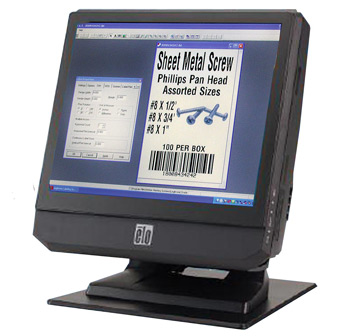
Touch-Screen Print Station

The 15″ LCD print station comes preloaded with Weber’s exclusive Legitronic® Labelling Software, a user- friendly package that makes it easy to format labels with alphanumeric text, bar codes and graphic images. In addition, the unit includes custom front-end software that permits operators to use the touch-screen to choose and print those formats.
The Legitronic software program works in the background, enabling the operator to see a simple front-end screen to select a specific label format, choose a printing system, and pick the quantity of labels to be printed. Variable data – if required – can be entered into a label format by using an on-screen keyboard.
Weber’s touch-screen print station has a compact design with a choice of configuration and connectivity options. This quiet, fan less unit also is easy to service.

Features
- Small footprint, 15″ LCD touch-screen print station
•Weber software is pre-installed
• Fan less operation for quiet environments
• Full range of standard connectivity ports
• Stable stand with tilt able display
Adobe Reader is required to open and view PDF files. This can be downloaded free from adobe.com.
Available Documents
touch-screen-print-stationZebra ZT510 Industrial Printer
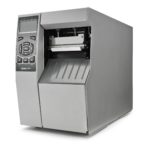
ZEBRA ZT510 – NEXT-GENERATION PRINTING THAT IS BUDGET-FRIENDLY
Designed to strike the ideal balance between performance and value, the Zebra ZT510 includes the core features you need in an industrial printer at a cost-effective price point.
View ProductGeset 141 Semi Automatic Label Dispenser
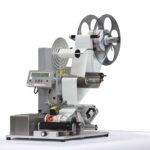
The Geset 141 semi-automatic all-round labelling system is used for labelling small tins, bottles, jars etc. This solution was developed especially for companies requiring flexible labelling of small batches. Classical applications include the pharmaceutical and cosmetics industry and the food and beverage sector.
View Product
Markoprint Integra Vivid
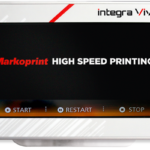
Unleash the Power of Modern Touch Operating Technology and an Innovative Swipe User Interface. Say Goodbye to Complicated Print Jobs and Say Hello to Effortless Operation of X1JET and PP Class Printing Systems. With the Freedom to Position the 7” High-Resolution HMI Color Display Anywhere You Choose, Prepare to Be Awed by the Ultimate Printing Flexibility and Innovation. Upgrade to integra Vivid Today and Embrace a New Era of Printing Excellence.
View ProductGeset 125 Horizontal Labelling System
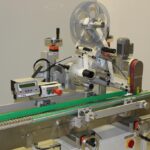
The Geset 125 labelling system is used to label cylindrical products automatically. Depending on the type and dimension of the product, different label sizes are used. The products are fed manually or by a conveying system provided by the customer at an infeed passage of the labelling system. Care should be taken on accurate alignment of the products between the two freely mounted rollers of the roll conveyor. The side guide’s position the products flush with the outside edge of the roll conveyor.
The roll conveyor feeds the products to the labeller. There the label is applied with the part running forward onto the product and it is pushed by rotation and the back pressure of the wrapping unit onto the product. The back pressure of the wrapping unit (the speed of the wrapping unit is twice as fast as the speed of the base conveyor) enables the product in rotation. The roll conveyor forwards the finished labelled products to the outfeed. Here the products are removed manually or by the customer’s conveying system.
View Product










