


Legi-Air 4050E Precision Labelling
E is a synonym for the word “ENHANCED”. Based on a modular construction the LA 4050E is capable of numerous methods to print and apply a label. The design comprises a feeder module, a printing module, label winder and unwinder with numerous applicator types. The standard Tamp-Blow system has a quick-change system for changing the tamp pad which significantly reduces the changeover time to other label formats.
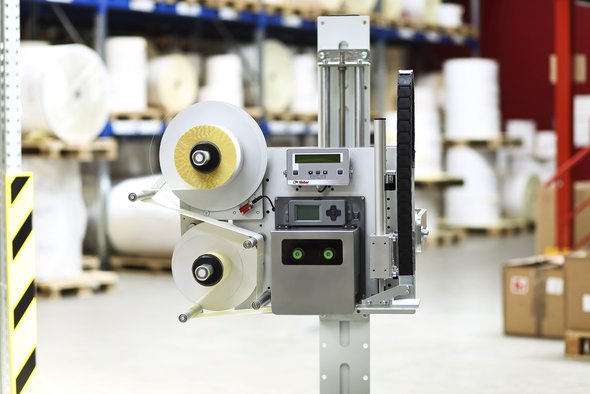
LA 4050E Modular for Cutomisation
The Legi-Air 4050E prints and feeds labels in lengths of 10 x 5 mm up to 180 x 300 mm with a feeder output of up to 210 labels per minute with the blow-box method. To optimise logistics in particular.
A two-stage vacuum for label transportation and feeding facilitates flexible adaptation to the labelling material and guarantees process reliability during labelling. Thanks to electronic vacuum and pressure measurement in conjunction with Festo pneumatics, the Legi-Air 4050 E feeds labels with maximum precision and speed.
Swivel applicators are available which allow for label application in numerous locations . A removable display controller supports this flexibility and facilitates simple and quick operation by means of targeted plain text user information and stored system parameters. Flexible control or networking of systems guarantees conventional standards such as Ethernet, serial and parallel data connections as well as USB.
Print Engine Technology
Working closely with all major international print engine manufacturers Weber has designed the LA 4050E with flexibility and localization in mind. Whether Zebra, Sato, Avery, CAB or Datamax-O’Neil is the print engine of the choice, the LA 4050E can accommodate. Where no customer preference is indicated our fully trained, experience and certified Sales staff will recommend the best print engine and application method to suit your individual requirements.
The LA 4050E also can be equipped with an RFID print module that supports existing RFID standards.
Adobe Reader is required to open and view PDF files. This can be downloaded free from adobe.com.
Available Documents
LA4050E_ukMarkoprint Integra PP RAZR
Experience Effortless High-Resolution Printing: Introducing the Integra PP RAZR with Cutting-Edge Technology. Print Up to 34mm High on Virtually Any Product Surface with Ease. Be Amazed by the Permanent Print Head’s Impressive Resolution, Lightning-Fast Speed, and Integrated Redundancy. Plus, its Compact Design Ensures Seamless Placement in Any Production Facility.
View ProductGeset 117 Top and Bottom Labelling System
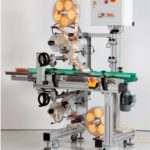
The Geset 117 labelling system is used to label square products on the top and bottom side automatically. Depending on the type and dimension of the product, different label sizes are used. The products are fed manually or by a conveying system provided by the customer at an infeed passage on the labelling system. Care should be taken on accurate alignment of the products. It is essential that the products are forwarded separately to the applicator with a gap between each other.
When the light barrier is reached, an application trigger is tripped. Both label applicators apply then in Wipe On procedure a label onto the product. The label on top side is pushed on the product by a brush or roller. The label on bottom side is pushed on the product by the self-weight of the product. After labelling the products move on and can be removed from conveyor by the customer.
View ProductMarkoprint Shutter Printhead HP
Inkjet nozzles can clog and dry up in a dusty printing environment, which is typical in wood-processing enterprises and other sectors. This results in poorly printed images. Our Markoprint Shutter Printhead HP prevents dust from entering the ink cartridge or gathering on the nozzles. During a production halt, the printhead automatically retracts the cartridge and shuts the open nozzle plate. After being paused for even several days, it is instantly ready to print again.
View ProductZebra FS20 Fixed Industrial Scanner
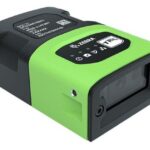
An Easily Integratable Scanning Solution
The increasing demands of international commerce and its global supply chain are pressuring companies to deliver more — and to do it faster. From manufacturing to logistics to the end customer, success is driven by the ability to quickly move and track the products that drive your business.
Address it all with the compact Zebra FS20 Fixed Industrial Scanner. With the FS20, it’s easy to track and trace every item as it moves through production, storage and fulfilment. Scan barcodes on components moving through your assembly line to ensure the right part is used at the right time — and enable rapid targeted recalls of products that contain defective parts. Scan barcodes on items as they are placed on warehouse shelves to provide visibility into real time inventory. And scan barcodes when fulfilling orders to ensure the right items are sent to the right customer. Whatever you want to track and trace, the FS20 makes it easy.
View Product










