


Warehousing


Adobe Reader is required to open and view PDF files. This can be downloaded free from adobe.com.
Available Documents
software-brochureMarkoprint IP-Jet
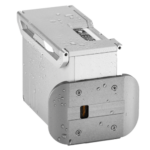
The thermal inkjet printer IP-JET HP MK3 has been specifically designed for usage in dusty or damp situations. It is especially ideal for the food sector, as well as the plastics, pharmaceutical, and chemical industries, due to its IP65 protection level.
The IP-JET HP is a small inkjet printer with a printhead and control unit housed in one unit. Water and dust are kept out of the cartridge by sealing it and pressurizing it. The power supply features a waterproof connector, and the external connections’ connectors are secured with an IP67 rating. The printhead does not need to be covered or removed for wet cleaning, unlike many other printers on the market.
View ProductMarkoprint Shutter Printhead HP
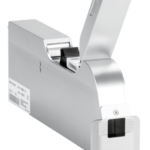
Inkjet nozzles can clog and dry up in a dusty printing environment, which is typical in wood-processing enterprises and other sectors. This results in poorly printed images. Our Markoprint Shutter Printhead HP prevents dust from entering the ink cartridge or gathering on the nozzles. During a production halt, the printhead automatically retracts the cartridge and shuts the open nozzle plate. After being paused for even several days, it is instantly ready to print again.
View ProductGeset 117 Top and Bottom Labelling System

The Geset 117 labelling system is used to label square products on the top and bottom side automatically. Depending on the type and dimension of the product, different label sizes are used. The products are fed manually or by a conveying system provided by the customer at an infeed passage on the labelling system. Care should be taken on accurate alignment of the products. It is essential that the products are forwarded separately to the applicator with a gap between each other.
When the light barrier is reached, an application trigger is tripped. Both label applicators apply then in Wipe On procedure a label onto the product. The label on top side is pushed on the product by a brush or roller. The label on bottom side is pushed on the product by the self-weight of the product. After labelling the products move on and can be removed from conveyor by the customer.
View ProductPLUSMARK – Premium Wax
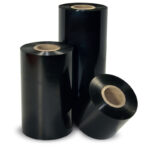
PLUSMARK is the high performance wax ribbon from Weber. It offers all
the benefits of a general purpose wax ribbon with an improved print durability
and a capability to print on synthetic label materials.











