


Retail Software
Retail Mobile Solutions Whether you are looking for an online, fully integrated solution or a simple office solution, Weber makes moving to a modern mobile logistic and sales-assistant solution easy. The retail software solution gives your stores new and more efficient ways handle logistics and support your customers shopping. Retail Mobile Logistics Solutions Inventrory […]

Retail Mobile Solutions
Whether you are looking for an online, fully integrated solution or a simple office solution,
Weber makes moving to a modern mobile logistic and sales-assistant solution easy. The retail software solution
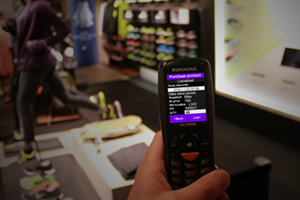 gives your stores new and more efficient ways handle logistics and support your customers shopping.
Retail Mobile Logistics Solutions
Inventrory counting app are the most common in Retail
Here are some more examples of where mobile solutions are used in Retail:
– Reciving goods app
– Price and shelf label printing app
– Order products from suppliersa app
– Move good from one store to another app
– Reciving goods app
– Mobile store sales assistant app
– Que busting app
Adobe Reader is required to open and view PDF files. This can be downloaded free from adobe.com.
Available Documents
software-brochureMarkoprint Integra One
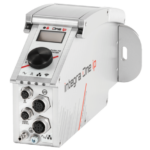
Labeling systems are not always easy to integrate into preexisting production lines. The Markoprint Integra One can be easily integrated into production processes thanks to its compact dimensions of 186 x 86 x 98 mm. The printing system has a display for data entry as well as system settings modification and verification. This information can also be viewed from mobile devices if the WLAN version is selected.
Inkjet printers should be properly protected if they are subjected to harsh manufacturing circumstances. In addition, the Markoprint integra One ip has an IP 65 protection rating. As a result, it’s ideal for use in the food industry.
View ProductMarkoprint ZTV HP
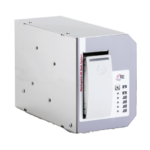
The Markoprint ZTV HP is a Central Ink Supply (CIS) system stores up to 400ml of ink for Markoprint HP Class inkjet printing systems such as the Markoprint integra One, Markoprint X2JET / X4JET, and Markoprint integra Quadro.
The large ink tank prevents frequent cartridge replacements from lowering your Overall Equipment Effectiveness (OEE). It can hold up to four single HP cartridges repaying you rapidly thanks to reduced ink prices. For non-interrupted production, the system can be paired with our NonStopPrinting printhead. Using an interface directly on the cartridge, current ink filling levels are monitored in real time. When the levels in the bulk tank fall below a certain threshold, a valve to the bulk tank opens and automatically refills it.
View ProductZebra FS20 Fixed Industrial Scanner
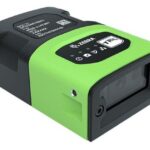
An Easily Integratable Scanning Solution
The increasing demands of international commerce and its global supply chain are pressuring companies to deliver more — and to do it faster. From manufacturing to logistics to the end customer, success is driven by the ability to quickly move and track the products that drive your business.
Address it all with the compact Zebra FS20 Fixed Industrial Scanner. With the FS20, it’s easy to track and trace every item as it moves through production, storage and fulfilment. Scan barcodes on components moving through your assembly line to ensure the right part is used at the right time — and enable rapid targeted recalls of products that contain defective parts. Scan barcodes on items as they are placed on warehouse shelves to provide visibility into real time inventory. And scan barcodes when fulfilling orders to ensure the right items are sent to the right customer. Whatever you want to track and trace, the FS20 makes it easy.
View ProductMarkoprint Shutter Printhead HP
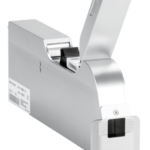
Inkjet nozzles can clog and dry up in a dusty printing environment, which is typical in wood-processing enterprises and other sectors. This results in poorly printed images. Our Markoprint Shutter Printhead HP prevents dust from entering the ink cartridge or gathering on the nozzles. During a production halt, the printhead automatically retracts the cartridge and shuts the open nozzle plate. After being paused for even several days, it is instantly ready to print again.
View Product










