


X2Jet Touch
The particularly compact and cost-effective X2JET Plus System is ideal for the foodstuffs, chemicals, building materials, and pharmaceutical industries. This innovative system marks absorbent and semi-absorbent surfaces – fast, accurately and reliably. The touchscreen interface and animated graphics makes it user-friendly and easy-to-use. Using a USB stick, data transfer is simple and reliable.
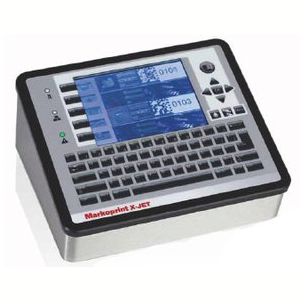
X2JET Touch
Intelligent, high-speed control system for demanding marking applications. Three printing technologies can be controlled simultaneously.
-
-
-
- Touch-screen to operate the system simply
-
-
-
-
-
- Parallel operation using a standard keypad and function keys
-
-
-
-
-
- Networking possibilities using TCP/IP, USB and EIA232
-
-
-
-
-
- Possibility of printing on up to two production lines
-
-
-
-
-
- Simultaneous marking of primary and secondary packaging using a controller
-
-
-
-
-
- System prints with true typeface
-
-
-
-
-
- All 1 & 2 dimensional barcodes can be printed
-
-
Adobe Reader is required to open and view PDF files. This can be downloaded free from adobe.com.
Available Documents
X2Jet PlusInk Guide 2015
Inkjet Coding Overview Brochure
Markoprint Integra One ip LX
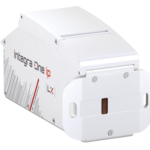
Unleash the Power of Proven Washdown Technology (IP Protection) for Seamless Performance in Complex and Demanding Applications. Experience High-Speed Printing and Effortless Operation with Up to 10 mm Print Distance. Discover Impressive Innovations, including a Patented Mechanism for Secure Ink/Printhead Unit Hold, Setting a New Standard in Printing Excellence.
View ProductGeset 125 Horizontal Labelling System
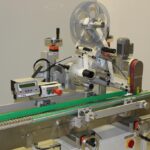
The Geset 125 labelling system is used to label cylindrical products automatically. Depending on the type and dimension of the product, different label sizes are used. The products are fed manually or by a conveying system provided by the customer at an infeed passage of the labelling system. Care should be taken on accurate alignment of the products between the two freely mounted rollers of the roll conveyor. The side guide’s position the products flush with the outside edge of the roll conveyor.
The roll conveyor feeds the products to the labeller. There the label is applied with the part running forward onto the product and it is pushed by rotation and the back pressure of the wrapping unit onto the product. The back pressure of the wrapping unit (the speed of the wrapping unit is twice as fast as the speed of the base conveyor) enables the product in rotation. The roll conveyor forwards the finished labelled products to the outfeed. Here the products are removed manually or by the customer’s conveying system.
View ProductMarkoprint ZTV HP
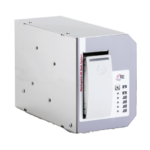
The Markoprint ZTV HP is a Central Ink Supply (CIS) system stores up to 400ml of ink for Markoprint HP Class inkjet printing systems such as the Markoprint integra One, Markoprint X2JET / X4JET, and Markoprint integra Quadro.
The large ink tank prevents frequent cartridge replacements from lowering your Overall Equipment Effectiveness (OEE). It can hold up to four single HP cartridges repaying you rapidly thanks to reduced ink prices. For non-interrupted production, the system can be paired with our NonStopPrinting printhead. Using an interface directly on the cartridge, current ink filling levels are monitored in real time. When the levels in the bulk tank fall below a certain threshold, a valve to the bulk tank opens and automatically refills it.
View ProductX1Jet HP Premium MK2
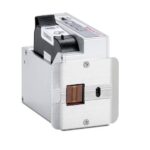
The innovative Markoprint X1JET HP inkjet printer codes absorbent and semi-absorbent surfaces quickly, accurately and reliably. It is designed for a different range of applications in the food and beverage industry as well as the chemical and pharmaceutical industry. The controller and printer are combined in one single unit, making the system extremely compact.
View Product










