


MC3200 Mobile Computer
Redefine productivity and reliability with the MC3200 mobile computer, the next generation in the class-leading MC3000 Series, now with more options to meet your needs. Choose the right operating system for your business – Android Jelly Bean or Microsoft Embedded Compact 7. Your choice of our most advanced 1-D laser or 1-D/2-D imager scan engine allows your workers to easily capture barcodes in any condition.
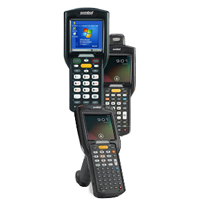
Supports both Android Jelly Bean and Microsoft Embedded Compact 7
You get the flexibility to choose the leading operating system that best meets the needs of your business and your workers. And the ability to swap operating systems allows you to future proof your investment.*
(*OS swap is only supported on Premium CE and Android Configurations. Devices must be sent to a service depot to perform the OS swap.)
Extensions (Mx) by Zebra Technologies fortifies Android for the enterprise
Integrated into Android, Mx adds the features needed to transform Android from a consumer operating system (OS) to a true enterprise-class OS, including security, device management and support for enterprise data capture capabilities.
The power to support the most demanding applications
A dual core 1 GHz processor, your choice of 2 or 4 GB of Flash memory and up to 32 GB of additional SD memory provides the power to run multiple complex applications — simultaneously.
Unparalleled barcode scanning performance improves productivity
Whether you choose the 1-D laser or 2-D imager engine, your workers get our most advanced scanning technology, able to capture barcodes as fast as they can press the trigger — regardless of whether items are in hand or on high racks in the warehouse, or whether barcodes are scratched, poorly printed or dirty.
Enhanced battery design
The new all-in-one combination battery/battery door provides one-step fast battery changing.
Three lightweight models bring all day comfort to scan intensive jobs
Mix and match brick, gun-style or rotating turret form factors with three different keypads to streamline data capture for different types of workers.
Cost-effectively upgrade from any MC3000 Series model
Accessory compatibility allows you to upgrade to the latest mobile technology — and preserve existing technology investments.
Adobe Reader is required to open and view PDF files. This can be downloaded free from adobe.com.
Available Documents
MC3200 Spec SheetMarkoprint Integra PP 108
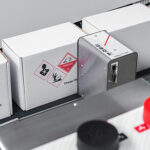
The Markoprint Integra PP108 is the first inkjet printer with SEIKO printing technology and a circulating ink system. It features a POZIFLOW circulating ink system which prevents the accumulation of air in the nozzles and ensures a permanent, clean print image without missing print due to blocked nozzles. The system’s ink tank can be installed above, below, or at the same height as the print head without any problems. The new SEIKO printhead has a print height of 108 mm and achieves a remarkable speed of up to 150 meters per minute with a high resolution of 360 dpi.
Suited to Dual Colour Printing Applications such as Hazard Labelling, Dual Colour overprinting and Direct Printing Applications to corrugate, and web printing applications, the PP108 is the latest high end, economical Inkjet System using the latest Drop on Demand Printing Technology.
View ProductMarkoprint Integra Vivid
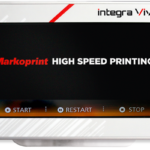
Unleash the Power of Modern Touch Operating Technology and an Innovative Swipe User Interface. Say Goodbye to Complicated Print Jobs and Say Hello to Effortless Operation of X1JET and PP Class Printing Systems. With the Freedom to Position the 7” High-Resolution HMI Color Display Anywhere You Choose, Prepare to Be Awed by the Ultimate Printing Flexibility and Innovation. Upgrade to integra Vivid Today and Embrace a New Era of Printing Excellence.
View ProductGeset 125 Horizontal Labelling System
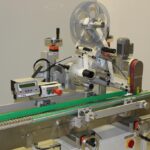
The Geset 125 labelling system is used to label cylindrical products automatically. Depending on the type and dimension of the product, different label sizes are used. The products are fed manually or by a conveying system provided by the customer at an infeed passage of the labelling system. Care should be taken on accurate alignment of the products between the two freely mounted rollers of the roll conveyor. The side guide’s position the products flush with the outside edge of the roll conveyor.
The roll conveyor feeds the products to the labeller. There the label is applied with the part running forward onto the product and it is pushed by rotation and the back pressure of the wrapping unit onto the product. The back pressure of the wrapping unit (the speed of the wrapping unit is twice as fast as the speed of the base conveyor) enables the product in rotation. The roll conveyor forwards the finished labelled products to the outfeed. Here the products are removed manually or by the customer’s conveying system.
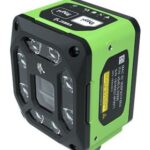
View ProductZebra FS40 Fixed Industrial Scanner
Enable Performance. Inspire Potential. Experience The Difference.
Today more than ever, the increasing demands of international commerce and its global supply chain are pressuring companies to deliver more — and to do it faster. From manufacturing to logistics to the end customer, success is driven by the ability to quickly move and track the products that drive your business.
Address it all with Zebra’s FS40 Fixed Industrial Scanner designed to meet the comprehensive requirements of today’s production and delivery processes. The FS40 easily keeps pace with the fastest moving operations, enabling track-and-trace through the automatic and flawless decode of information on every part and package as it moves through production, storage and fulfilment — capturing even the most challenging barcodes. The result? Best-in-class production, warehousing, distribution and logistics processes that inspire businesses to reach their highest potential.
View Product










