


Legitronic® Labeling Software
Weber’s proprietary Legitronic Labelling Software provides the versatile label design, printing and RFID encoding features that are required to meet today’s labelling requirements. The software is easy to use yet robust enough for industrial applications that need to use large databases.
As the cornerstone of our complete labelling systems, it is fully compatible with our extensive line of labelling equipment as well as most Zebra, Datamax and SATO label printers and print engines. An FDA compliance version also is available.
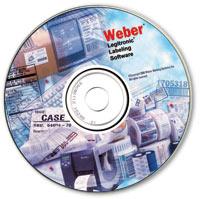
Legitronic® Labelling Software

Weber’s Legitronic Labelling Software offers many advanced features to simplify label creation – but that’s just the beginning. Our exclusive software also provides powerful information tools that integrate with other applications to streamline an entire operation.
Flexible Design Features
- Single-screen user interface
•WYSIWYG design screens
• Simple point-and-click operation
• Graphics compatibility with BMP, EPS, JPEG, PCX, WMF, TIFF, WPG and TGA files
• Supports all popular bar code symbologies
• Supports native printer fonts and bar codes, plus Windows® TrueType® fonts and Unicode characters
• Accepts constant and variable data
• Left/centre/right justification for text fields; flush right/left for paragraphs; auto word wrap; field concatenation
• Label design in any orientation
• Units of measure in inches, centimetres or printer dots
• Selectable bar code ratio, check digits, human-readable characters and module width
• Label margins and inter-label gap selection
• Auto incrementing, decrementing and full character serial numbers
Advanced Editing Features
- Display and grid-snap; on-screen ruler; various zoom options; permanent settings
•Select to move, copy, delete and align one or many fields/li>
• Tools to resize or rotate graphics
Powerful Printing Capabilities

- WYSIWYG viewing for quality inspection prior to printing
•Print in any orientation
• Print to multiple printers
• Formats can be converted to a different printer type
• On-demand setting of print speed and darkness
• Supports printer-downloaded fonts, graphics and label templates
Information Processing
- Uses OLE-compatible databases
•Uses ODBC-compatible databases
• Point-and-click record selection
• Database sharing on a network
• Powerful database query feature
Additional Features
- VBA-enabled for customization of label design and label printing solutions
•Multi-lingual prompts and foreign language versions available
RFID Encoding Features
- Encodes tags compatible with EPC Gen 2
•Encodes tags to comply with DoD specifications
• User interface simplifies the encoding of RFID labels
Secure Series for FDA Compliance
Weber’s Secure Series is a version of Legitronic Labelling Software that includes the new Security Administrator that helps meet the requirements of FDA 21 CFR Part 11, a compliance standard regarding electronic records and electronic signatures.
While this specialized package is essential for FDA compliance, it also can be used by companies that wish to record and retain secure label information as a by-product of the labelling process. Key features include:
- Ability to discern altered records
•Ability to generate copies of electronic records in human-readable and electronic form
• Enables the accurate retrieval of electronic records
• Limits system access
• Keeps a time-stamped audit trail of various actions
• Provides extra security measures for open systems
• Maintains numerous electronic signature requirements, components and controls
Adobe Reader is required to open and view PDF files. This can be downloaded free from adobe.com.
Available Documents
software-brochureGeset 112 Bottom Labelling System
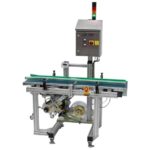
The Geset 112 labelling system is used to label square products on the bottom side automatically. Depending on the type and dimension of the product, different label sizes are used. The products are fed manually or by a conveying system provided by the customer at an infeed passage on the labelling system. Care should be taken on accurate alignment of the products. It is essential that the products are forwarded separately to the applicator with a gap between each other.
When the light barrier is reached, an application trigger is tripped. The label applicator applies then in Wipe On procedure a label onto the product. The label on bottom side is pushed on the product by the self-weight of the product. After labelling the products move on and can be removed from conveyor by the customer.
View ProductMarkoprint Integra Ultimate
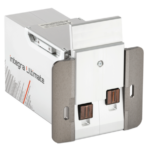
The innovative Integra Ultimate thermal inkjet printer not only provides IP65 protection against dust and moisture, but it also closes and cleans the nozzle plate at each pause. This system ensures that the printing is always clean, with faultless results even after extended breaks. As a result, the ink cartridges’ open times are multiplied many times. Two HP Class thermal inkjet ink cartridges can be used with the print head. As a result, the system produces beautiful prints with a maximum height of 25 mm.
View ProductMarkoprint NonStop Printing
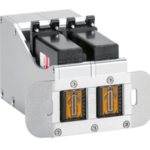
To enable continuous marking in ongoing production, our Markoprint NonStopPrinting printhead holds two alternately printing cartridges. Because the other ink cartridge is printing on the same position, each ink cartridge can be changed, cleaned, or serviced without pausing the machine.
An intelligent automatism prevents both cartridges from going empty at the same time. The first cartridge will always print two consecutive print jobs, taking turns with the second cartridge, which will only print one. This sophisticated automatism avoids both cartridges from running out at the same time. This will keep the ink from drying out in both cartridges. When the cartridge with the larger print volumes is empty, a warning will show, and the other cartridge will continue printing until it is replaced. The new cartridge will print the lower quantities to allow for you to replace the “older” cartridge. A sophisticated workflow that will boost your efficiency and productivity.
View ProductMarkoprint Shutter Printhead HP
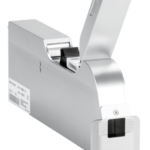
Inkjet nozzles can clog and dry up in a dusty printing environment, which is typical in wood-processing enterprises and other sectors. This results in poorly printed images. Our Markoprint Shutter Printhead HP prevents dust from entering the ink cartridge or gathering on the nozzles. During a production halt, the printhead automatically retracts the cartridge and shuts the open nozzle plate. After being paused for even several days, it is instantly ready to print again.
View Product










