


MP Compact4 Mark II (Datamax)
The Compact4 is a powerful response to desktop thermal printing requirements, and ideal for on-demand printing, especially where space is limited. The printer is ideal at the front desk of a hospital or in the box office of a movie theatre. Able to deliver continuous operation, the Compact4 is the printer of choice whenever ease of use, reliability and high performance are a must.
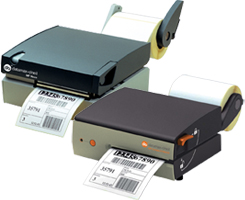
The Compact4 Mobile is designed for installation on forklift trucks and mobile stations. It can operate from a connection to a forklift’s battery and its vibration proof design makes it the perfect choice for warehousing logistics.
Easy to use – Loading the Compact4 Mark II printers is unlike any other printer in the market. The levers are large and easy to manage — so easy that the operation can be done single handed while wearing a leather or latex glove. The paper path is slotted through the side of the printer with no covers to open or clam-shells to unlock. Reduce errors and increase efficiency – Printing directly from the forklift means you no longer have to move to a centralized printing station where the possibility of selecting and applying incorrect shipping labels greatly increases. Printing on demand and on location also improves fuel and time efficiency and by eliminating wasted travel to and from a centralized printing station.
[one_third last=”no”]
Transportation and Logistics
• Cross Docking
• Sorting Centers
• Shipping labels
• Pallet tracking
Retail
• Item labels
• Shelf tags
• Specials and Talkers
• Return labeling
• Ticketing [/one_third]
[one_third last=”yes”]
Pharmaceuticals
• Compliance labels
• Product identification
• Track and trace
• Pick lists
Manufacturing
• Asset tracking
• Work in progress
• Agency labels
• Instruction labels[/one_third]
Adobe Reader is required to open and view PDF files. This can be downloaded free from adobe.com.
Available Documents
MP_Compact4 MIIMarkoprint Integra Quadro/Quadro²
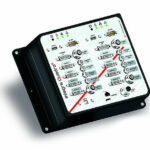
The new Markoprint Integra Quadro/Quadro² print controller can control up to four inkjet printers or four print positions at the same time. This allows you to print on both sides of primary and secondary packaging on one or two separate production lines. There are also two separate printing methods that can be used in this process.
The Markoprint Integra Quadro/Quadro² can easily cope with limited space thanks to its slender design. Installation inside or directly at the industrial line is straightforward thanks to the different fixation options. It was designed specifically for installation in control panels and machinery.
View ProductMarkoprint ZTV HP
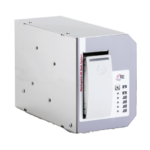
The Markoprint ZTV HP is a Central Ink Supply (CIS) system stores up to 400ml of ink for Markoprint HP Class inkjet printing systems such as the Markoprint integra One, Markoprint X2JET / X4JET, and Markoprint integra Quadro.
The large ink tank prevents frequent cartridge replacements from lowering your Overall Equipment Effectiveness (OEE). It can hold up to four single HP cartridges repaying you rapidly thanks to reduced ink prices. For non-interrupted production, the system can be paired with our NonStopPrinting printhead. Using an interface directly on the cartridge, current ink filling levels are monitored in real time. When the levels in the bulk tank fall below a certain threshold, a valve to the bulk tank opens and automatically refills it.
View ProductMarkoprint Integra Vivid
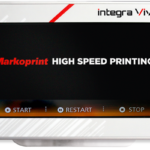
Unleash the Power of Modern Touch Operating Technology and an Innovative Swipe User Interface. Say Goodbye to Complicated Print Jobs and Say Hello to Effortless Operation of X1JET and PP Class Printing Systems. With the Freedom to Position the 7” High-Resolution HMI Color Display Anywhere You Choose, Prepare to Be Awed by the Ultimate Printing Flexibility and Innovation. Upgrade to integra Vivid Today and Embrace a New Era of Printing Excellence.
View ProductZebra FS40 Fixed Industrial Scanner
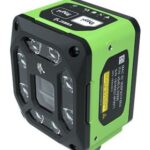
Enable Performance. Inspire Potential. Experience The Difference.
Today more than ever, the increasing demands of international commerce and its global supply chain are pressuring companies to deliver more — and to do it faster. From manufacturing to logistics to the end customer, success is driven by the ability to quickly move and track the products that drive your business.
Address it all with Zebra’s FS40 Fixed Industrial Scanner designed to meet the comprehensive requirements of today’s production and delivery processes. The FS40 easily keeps pace with the fastest moving operations, enabling track-and-trace through the automatic and flawless decode of information on every part and package as it moves through production, storage and fulfilment — capturing even the most challenging barcodes. The result? Best-in-class production, warehousing, distribution and logistics processes that inspire businesses to reach their highest potential.
View Product










