


Deli Labels
We can work with you to create amazing looking labels that will work with your container and handle the environmental conditions that it will be stored in like refrigeration or moisture. Your label has to not only keep your product safe but also needs to entice the customer into buying your product. Bright colors, metallic foils, clear films and more are just some of the design options that will set you apart from the crowd.
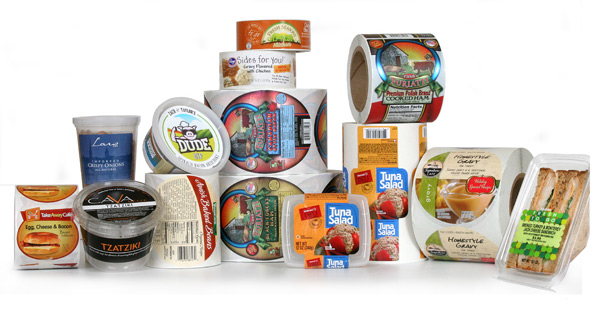
A Deli department usually has hundreds of different shaped containers and packages for all the delicious foods they sell. All those odd-shaped containers need labels. And the labels have to look good.
Deli Label Tips
Materials:
- Use a clear label material or metallic foils for the look of quality and to create dimensional effects with your label.
- Be sure to use label materials that will stand up to damp and/or refrigerated conditions.
- Always test your label adhesives to make sure they will stick securely to your containers, especially plastic clamshells and other non-paper materials.
Artwork:
- Use unique designs and colors to create a family of products. This makes it easier for consumer to return to your brand by sight.
- Keep your design simple but eye-catching. Create patterns on your label or subtle designs using dull or gloss varnishes.
- Custom die shapes allow you to use interesting shapes for your label.
- Add a QR code so your customers can interact with your company, get coupons, recipes and more.
|
Gravy Labels Deli labels come in all shapes and sizes, and many of them are round labels used for clamshell and lidded containers like this gravy label. This label is a great example of an appetizing design using complimentary colors and showing the product in use. This label is also part of a family of labels for this brand that are easily recognizable and that change slightly with the season. These labels were printed on our high-resolution HP digital presses. Label Size: 5.0″ circle Facestock: Glossy paper Print method: Digital Top Coat: None |
 |
|
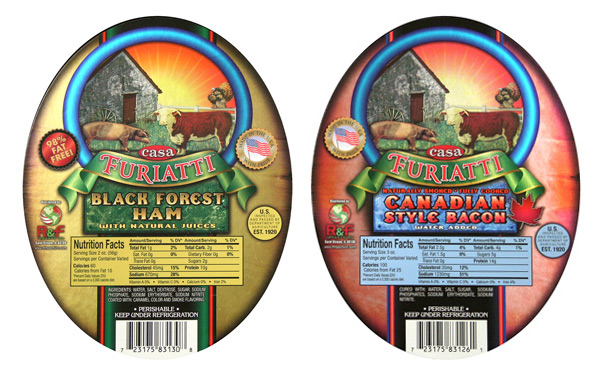
Deli Meat Labels These labels are a redesign we did for a company that manufactures deli meats. The upgrade of their label included using foil to create reflective highlights and a more modern, realistic look to the label. Photography does not do these metallic labels justice. If you would like to see what they really look like, click on the label sample request button below to receive your own copies. Just mention metallic labels. Label Size: 4.5″ wide x 5.75″ high Facestock: Metallic foil Print method: Digital Top Coat: Dull spot varnish |
 |
Adobe Reader is required to open and view PDF files. This can be downloaded free from adobe.com.
Available Documents
Geset 117 Top and Bottom Labelling System
The Geset 117 labelling system is used to label square products on the top and bottom side automatically. Depending on the type and dimension of the product, different label sizes are used. The products are fed manually or by a conveying system provided by the customer at an infeed passage on the labelling system. Care should be taken on accurate alignment of the products. It is essential that the products are forwarded separately to the applicator with a gap between each other.
When the light barrier is reached, an application trigger is tripped. Both label applicators apply then in Wipe On procedure a label onto the product. The label on top side is pushed on the product by a brush or roller. The label on bottom side is pushed on the product by the self-weight of the product. After labelling the products move on and can be removed from conveyor by the customer.
View ProductMarkoprint Integra PP RAZR
Experience Effortless High-Resolution Printing: Introducing the Integra PP RAZR with Cutting-Edge Technology. Print Up to 34mm High on Virtually Any Product Surface with Ease. Be Amazed by the Permanent Print Head’s Impressive Resolution, Lightning-Fast Speed, and Integrated Redundancy. Plus, its Compact Design Ensures Seamless Placement in Any Production Facility.
View ProductX1Jet HP Premium MK2
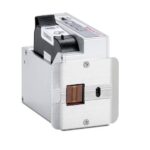
The innovative Markoprint X1JET HP inkjet printer codes absorbent and semi-absorbent surfaces quickly, accurately and reliably. It is designed for a different range of applications in the food and beverage industry as well as the chemical and pharmaceutical industry. The controller and printer are combined in one single unit, making the system extremely compact.
View ProductMarkoprint NonStop Printing
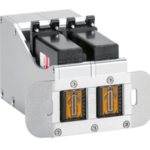
To enable continuous marking in ongoing production, our Markoprint NonStopPrinting printhead holds two alternately printing cartridges. Because the other ink cartridge is printing on the same position, each ink cartridge can be changed, cleaned, or serviced without pausing the machine.
An intelligent automatism prevents both cartridges from going empty at the same time. The first cartridge will always print two consecutive print jobs, taking turns with the second cartridge, which will only print one. This sophisticated automatism avoids both cartridges from running out at the same time. This will keep the ink from drying out in both cartridges. When the cartridge with the larger print volumes is empty, a warning will show, and the other cartridge will continue printing until it is replaced. The new cartridge will print the lower quantities to allow for you to replace the “older” cartridge. A sophisticated workflow that will boost your efficiency and productivity.
View Product










